
SQL Job Commander 0.2: See Your SQL Agent Jobs in a New Light
Anyone who manages SQL Server® Agent across several instances knows the routine. SSMS gives you one Job Activity Monitor window per instance, and the features you need are buried under menus. SQL Job Commander was built to fix that, and version 0.2 (0.2.2609.0, released September 17, 2026) is my biggest step forward since the initial release in June.
A New Foundation
Version 0.2 moves the application to Avalonia 12 and .NET 10. That gives us a more modern UI framework and a solid base for the roadmap ahead.
A Dashboard, and a Job Monitor That Fits How You Work
The new Dashboard tab gives you an at-a-glance overview when you connect. The Job Monitor is more flexible too. Open it as a standard tab or as a detachable window, configured per connection and remembered with your recent connections. If you run a second monitor, you can park your busiest instance there and keep working in the main window.
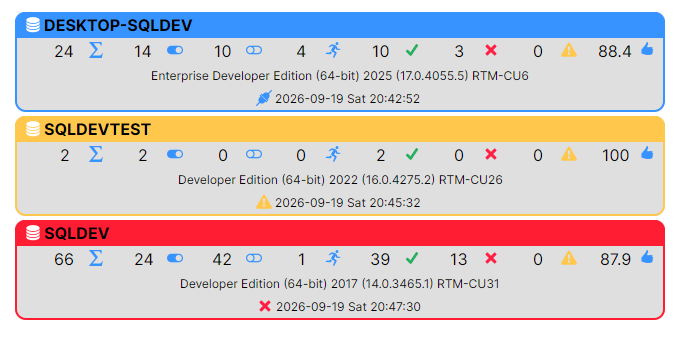
Each job now also shows p95 runtime statistics. Averages hide the outliers, and p95 shows you how long a job takes on its worst normal days, which is usually where the trouble starts.
The Historical Heatmap
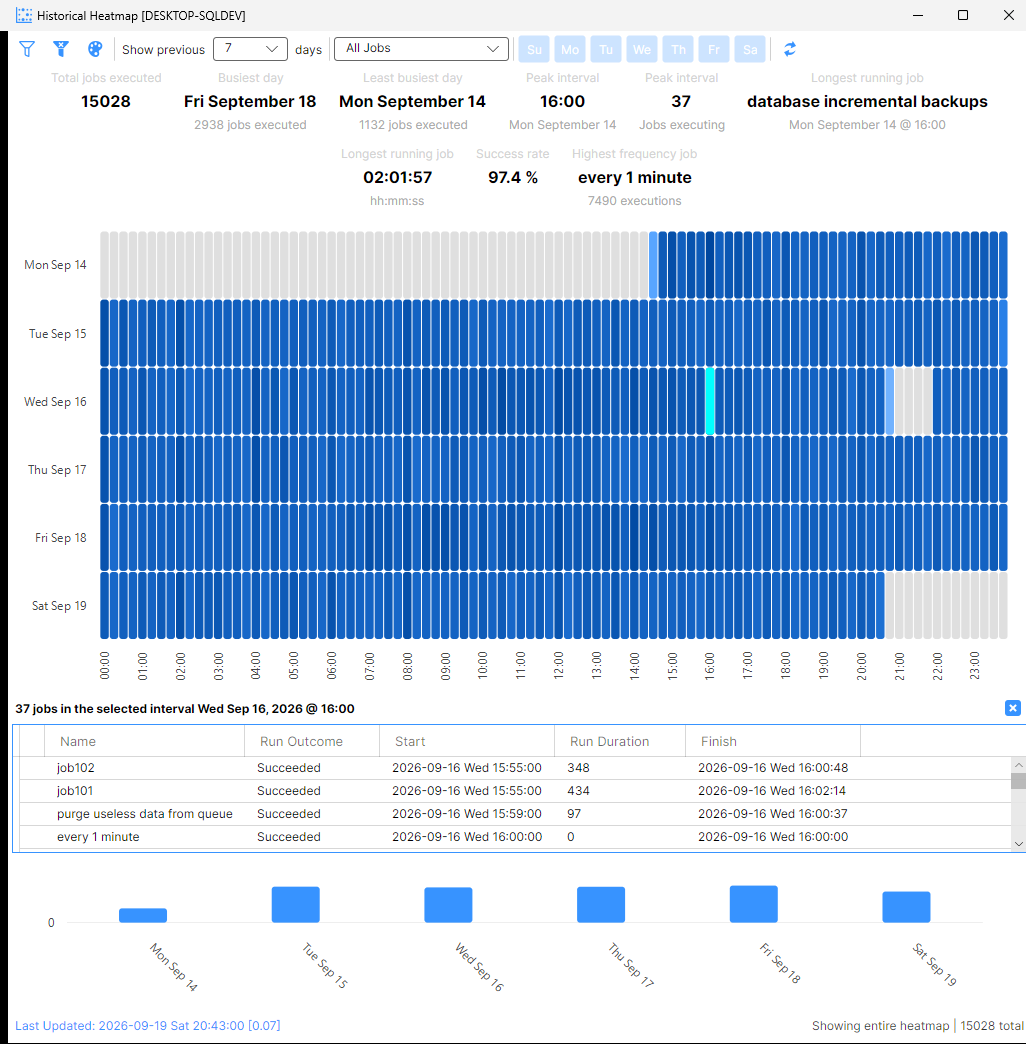
The historical heatmap shows up to 31 days of job history in one view. Rows are actual calendar dates, and days with no activity are compressed out so the chart shows only the days that matter. Click a cell to drill into what ran, and the selection stays highlighted so you don’t lose your place. It makes failure clusters, runtime creep, and busy windows easy to spot.
Quality-of-Life Improvements
- Session logs are searchable by instance, so a busy multi-server session is easy to filter.
- Theme preference (Light, Dark, or OS Detect) is saved and restored automatically.
- New Preferences options let you choose whether the Job Monitor opens in its own window by default, unless a saved connection overrides it.
- Better keyboard navigation: dialogs close with
Escand support default buttons, and tab stops no longer land on hidden elements. - The Job Monitors tab appears only once you’re connected, and only when the monitor isn’t already in its own window. Session Log is now the default tab.
Security, Updates, and Licensing
Saved connections should be safe to keep around. Credentials for recent connections are protected with Windows DPAPI, with only the username and password encrypted. Licensing uses signed license validation, and feature access has been renewed through November 30, 2027.
If you download from brentec.ca, the app now checks for updates automatically on startup. You can also check on demand from the notification icon in the bottom-right corner of the main window.
Get It Today
Whether you manage five jobs or five hundred, version 0.2 makes SQL Server® Agent management more centralized and easier to see. Download it from the Microsoft Store or directly from brentec.ca, and see the Change Log for the full details. I’d love to hear what you think.
I’d keep idle dates visible: “days with no activity are compressed out” could obscure a missed scheduled run, even if the heatmap looks tidier.
Thank you for the feedback. Agreed. I did realize this myself during usage, and in version 0.3 (currently in development), days without any activity will be shown.